
SafetyPro Fire · graphical supervision
Graphical supervision: every alarm on one floor plan
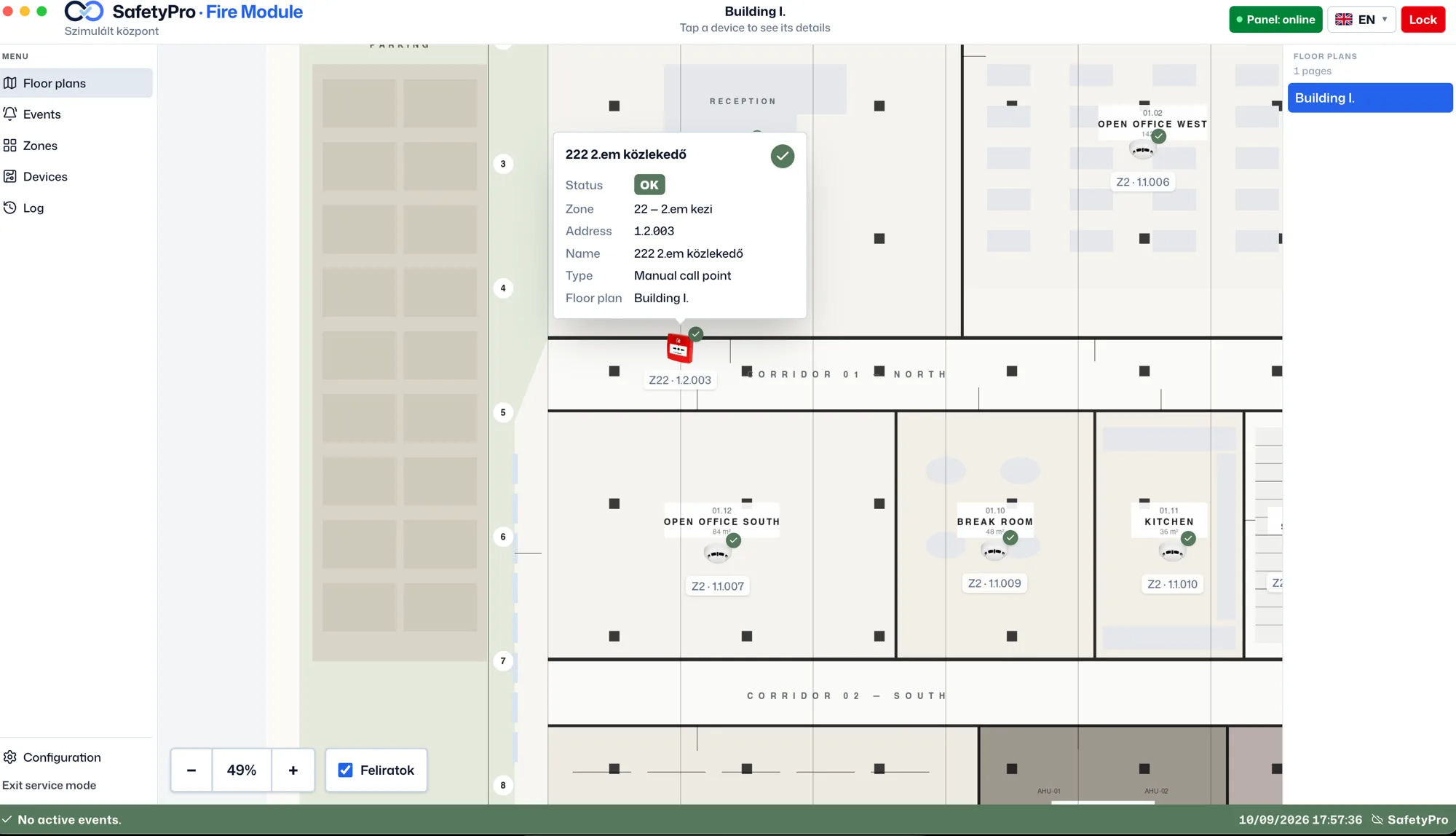
The live state of your building's safety systems on a single floor plan. The fire panel is already running live; cameras and further systems connect through the same driver layer, so operators never have to switch between applications.
What the operator gets
The graphical supervision workstation projects the live state of the fire panel onto the building floor plan: zone, device, analogue value and event log on one screen, on Windows and macOS. Cameras and other building systems connect through the same driver layer, so operators only ever learn one application and every event lands in the same log.
- Everything that matters on one screen — Zone, device, status — and how long the alarm has been standing.
- An alarm takes you straight there — The view opens the affected floor plan and the responsible person gets a notification.
- Several systems, one view — Fire panel, cameras, access control and sync in the same application.
What the supervision module does
The floor plan shows where the alarm was
The symbol on the drawing marks the spot – no code to decode.
You are told instantly and visually
A full-screen, colour-coded alarm for the operator and a notification for the responsible person.
Every system in one interface
Fire panel, cameras, access control and sync in the same view.
Every event stays logged
Events, disablements, system log – searchable and exportable as a PDF extract.
Supported systems
What can you connect?
The workstation talks to each system through the manufacturer's documented interface, on a swappable driver layer. The fire panel is already running live, and every further system sits on that same layer — so the operator's screen and the event log stay the same even when cameras or access control are added later.
Fire panel — Kentec Taktis / Hochiki L@titude
The same platform under two market names · Hochiki ESP and Apollo XP95 loop devices · MCE TCP/IP
- Can be integrated
Cameras
Camera views tied to the devices on the floor plan
- Can be integrated
Access control
Doors and access points on the same floor plan
- Can be integrated
System sync
Clock, configuration and event sync with the connected panels
If your panel, cameras or access control are not on the list yet, get in touch – with the manufacturer's protocol documentation we can tell you what the integration would take.
Secure. Searchable. Smart.
The operator gets oriented in seconds
No codes or loop addresses to decode: the floor plan shows which room the alarm is in.
The log stays on site
Events, alarms and disablements are kept locally in an encrypted database, with PDF extracts.
Your existing systems stay
The workstation sits next to the existing panel, not instead of it – nothing has to be replaced.